
Planet Zoo 2 task guide
How to release animals into a Wildlife Reserve
1. Put eligible animals in Storage
Section titled “1. Put eligible animals in Storage”Select the animal’s Info Panel and use Send animal to Storage in Trade Centre, or Move → Animal Trading Centre. Animal moves require a Trade Centre connected to the main path network. Newly adopted animals arrive in Animal Storage, but being in Storage does not automatically satisfy a group’s eligibility requirements.
2. Create the Release Group
Section titled “2. Create the Release Group”Open Animal Trading & Storage → Release Groups in the zoo. In a Wildlife Reserve, build a Research Outpost before using its Release Groups tab.
- Choose Create Release Group.
- Select the species. Research may be needed before it is available.
- Choose a Group Type, then Create.
- Open Edit Group Members and add eligible animals from Storage. Follow the membership conditions displayed for that group; do not apply another species’ group size.
The Release Group record separates species research, membership and finalisation. For a lynx-related tutorial, these are still the correct system checks; this guide does not promise a particular tutorial reward or gift trigger.
3. Check before finalising
Section titled “3. Check before finalising”Before you finalise
Choose Release to Wildlife Reserve for a reserve destination. Quick Release is a different action that provides immediate Conservation Credits; it is not the same as placing the animals in an Ecosystem you manage.
4. Prepare the target Ecosystem
Section titled “4. Prepare the target Ecosystem”Use Planet Hub to choose a suitable reserve and Travel to Wildlife Reserve. With the Ecosystem Brush, choose the ecosystem type and paint its area. Inspect its Area, Terrain and Nature requirements, plus water or elevation where required. Selecting a Nature requirement filters the Browser to the objects needed.
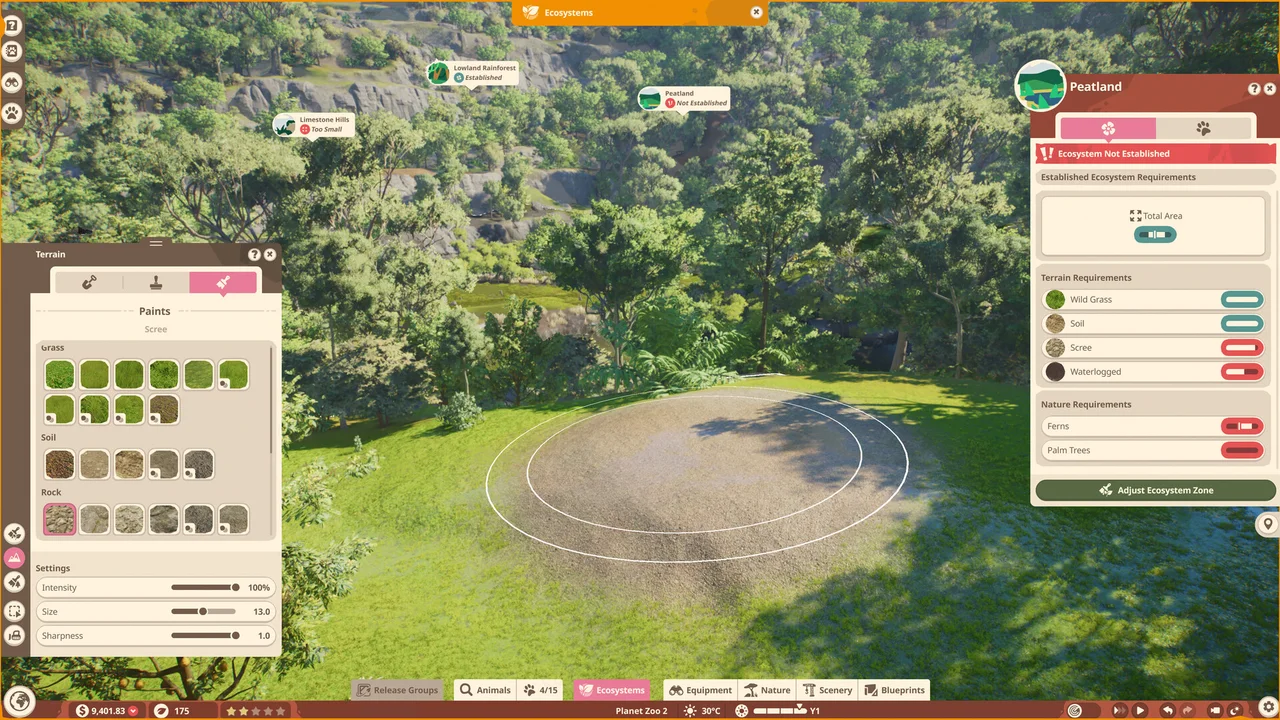
Satisfying the environmental requirements makes the Ecosystem Established. Flourishing additionally requires the specified ecosystem roles supplied by released groups. Some Release Groups need Flourishing rather than just Established, so read the group’s destination conditions.
5. Release the group
Section titled “5. Release the group”Select a suitable Established Ecosystem, or Flourishing one if the group requires it, and release the finalised group there. Use the group’s species and type requirements to choose its destination. Watch the Ecosystem’s role requirements when planning subsequent releases.
Which check is blocking you?
Section titled “Which check is blocking you?”| Blocked at | Check next |
|---|---|
| Species cannot be selected | Whether species research is needed for that group |
| No animals to add | Animals are already in Storage and meet the selected group’s eligibility rules |
| Reserve Release Groups tab unavailable | Research Outpost in that reserve; alternatively manage groups from zoo Animal Trading & Storage |
| Area is not Established | Area, Terrain, Nature and any required water/elevation |
| Established area still unsuitable | Whether this group needs Flourishing or another ecosystem type |
Related records: Release Group · Animal Storage · Ecosystem. Need a nest? Find the Medium Cup Nest.